Data Requirements
In traditional distributed systems, dependencies between services hide beneath the surface. A service assumes another service provides certain fields, responds in a certain shape, or is available at a certain time. These assumptions are invisible: they live in code, not in contracts. You discover them when something breaks in production. A field gets renamed, a service changes its response format, or a new team removes data another team depended on without knowing.
Fusion makes these dependencies declarative and validated at build time. When a resolver in one subgraph needs data from another subgraph, it declares that dependency explicitly in the schema using the @require directive. The composition step validates that every declared dependency is satisfiable before any code reaches production: the required fields must exist, be reachable, and have compatible types. If a dependency cannot be satisfied, composition fails and tells you exactly what is missing and where.
This shifts cross-service data dependencies from hidden runtime failures to visible, validated build-time contracts.
This chapter covers the directives and attributes that make this work: @require for declaring data requirements and @provides for declaring fields that a subgraph can resolve locally alongside an entity reference. You will learn the full range of patterns and the syntax behind each directive.
Declaring Data Dependencies
Use @require on a resolver argument when that argument's value must come from fields owned by other subgraphs. Instead of calling another service yourself, you declare what data you need and the gateway fetches it for you.
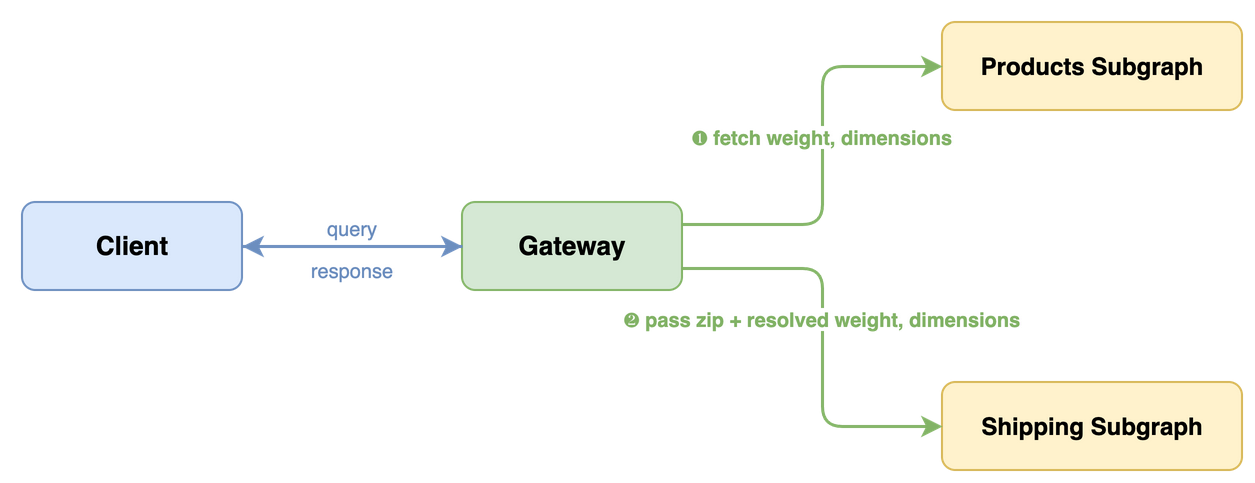
Here is the simplest case: a resolver in the Shipping subgraph needs the product's weight to calculate a shipping estimate. The Products subgraph owns weight, not the Shipping subgraph. With @require, the Shipping subgraph declares this dependency directly in its schema:
GraphQL schema
# Shipping subgraphtype Product {  id: ID!  shippingEstimate(zip: String!, weight: Float! @require(field: "weight")): Int!}
type Query {  productById(id: ID!): Product @lookup @internal}
The @require(field: "weight") directive on the weight argument tells the gateway: "Before calling this resolver, fetch weight from whichever subgraph can provide it and pass it in as the weight argument."
C# resolver
[ObjectType<Product>]public static partial class ProductNode{ public static int GetShippingEstimate( [Parent] Product product, string zip, [Require] float weight) => ShippingCalculator.Estimate(zip, weight);}
The [Require] attribute maps to @require(field: "weight") in the exported schema. Because the C# argument name weight matches the entity field name, the field path is inferred automatically.
When the names differ, provide the field path explicitly:
public static int GetShippingEstimate( [Parent] Product product, string zip, [Require("weight")] float packageWeight) => ShippingCalculator.Estimate(zip, packageWeight);
Public facing composite schema (what clients see)
type Product { shippingEstimate(zip: String!): Int!}
The weight argument is gone. Clients pass only zip. The gateway handles the resolution of weight transparently.
How the Gateway Resolves Requirements
When a resolver declares a data requirement with @require, three things happen during composition and execution:
- Composition reads the
@requiredirective and removes the annotated argument from the composite schema. Clients never see it. - Query planning detects the dependency. The gateway plans an additional fetch to retrieve the required fields from whichever subgraph can provide it.
- Execution fetches the required data first, then passes it as a resolver argument when invoking the downstream subgraph.
The resolver receives the data as if it were a normal argument. It does not know or care where the data came from. Services are not coupled to each other. The contract is between a resolver and the data it needs, not between one service and another.
Complex Requirements with Input Objects
When a resolver needs multiple fields, you can gather them into a single input object using FieldSelectionMap syntax. This is a clean approach as it puts all the requirements for a resolver into a single argument.
GraphQL schema
# Shipping subgraphtype Product {  id: ID!  deliveryEstimate(    zip: String!    dimension: ProductDimensionInput!      @require(        field: """        {          weight,          length: dimensions.length,          width: dimensions.width,          height: dimensions.height        }        """      )  ): Int!}
input ProductDimensionInput {  weight: Float!  length: Float!  width: Float!  height: Float!}
The FieldSelectionMap inside @require tells the gateway how to populate the ProductDimensionInput from fields on the Product entity:
weightmaps directly because the input field name matches the entity field name.length: dimensions.lengthmaps the input fieldlengthfrom the nested entity pathdimensions.length. The same applies towidthandheight.
The fields referenced in the map do not all have to come from the same subgraph. The gateway resolves each field from whichever subgraph owns it. Your resolver declares what data it needs, not which services to call.
C# resolver
[ObjectType<Product>]public static partial class ProductNode{ public static int GetDeliveryEstimate( [Parent] Product product, string zip, [Require( """ { weight, length: dimensions.length, width: dimensions.width, height: dimensions.height } """)] ProductDimensionInput dimension) => ShippingCalculator.Estimate(zip, dimension);}
public sealed class ProductDimensionInput{ public float Weight { get; init; } public float Length { get; init; } public float Width { get; init; } public float Height { get; init; }}
Public facing composite schema (what clients see)
type Product { deliveryEstimate(zip: String!): Int!}
The dimension requirement argument is hidden from clients. Clients see only zip; the gateway resolves the nested fields (weight, length, width, height) automatically.
Multiple Scalar Requirements
You can annotate multiple arguments with @require on the same field. Each one declares an independent data dependency. So, while you can aggregate them into a single input object like explained above you also can spread them across arguments.
GraphQL schema
# Inventory subgraphtype Product { id: ID! shippingEstimate( zip: String! weight: Float! @require(field: "weight") price: Float! @require(field: "price") ): Int!}
C# resolver
[ObjectType<Product>]public static partial class ProductNode{ public static int GetShippingEstimate( [Parent] Product product, string zip, [Require] float weight, [Require] float price) => weight > 500 || price > 1000 ? ExpressShipping.Calculate(weight) : StandardShipping.Calculate(weight);}
Nested Field Paths
@require can reach into nested objects using dot notation.
GraphQL schema
type Product { id: ID! taxEstimate( countryCode: String! @require(field: "seller.address.countryCode") price: Float! @require(field: "price") ): Float!}
The gateway traverses seller.address.countryCode on the entity and passes the resolved value as the countryCode argument.
List Aggregation Paths
When an entity field is a list, you can use bracket notation to select a field from each element. The gateway collects the selected values into a flat list.
GraphQL schema
type Product { id: ID! taxEstimate( countryCodes: [String!]! @require(field: "seller.addresses[countryCode]") price: Float! @require(field: "price") ): Float!}
The path seller.addresses[countryCode] means: navigate to seller.addresses (a list), then select countryCode from each element. If the seller has three addresses with country codes "US", "DE", and "US", the resolver receives ["US", "DE", "US"] as the countryCodes argument.
Declaring Contextually Available Fields
Use @provides on a field that returns an entity to tell the gateway that certain subfields of that entity are available when resolved through this specific field. The subgraph does not own those fields globally, but it can provide them in this context.
When Contextual Availability Helps
Consider a Reviews subgraph where the author field returns a User entity. The User type and its username field are owned by the Accounts subgraph. Normally the gateway would need to call the Accounts subgraph to fetch username. But the Reviews subgraph already has the author's username available when resolving Review.author. By annotating the author field with @provides(fields: "username"), the subgraph tells the gateway: "When you resolve author through the Review entity on my subgraph, I can also give you username."
This is different from @shareable, which declares that a subgraph can always resolve a field. @provides is conditional: the data is only available when coming through a specific field path.
GraphQL schema
# Reviews subgraphtype Review {  id: ID!  body: String!  author: User @provides(fields: "username")}
type User {  id: ID!  username: String! @external}
type Query {  reviewById(id: ID!): Review @lookup}
The @provides(fields: "username") on author tells the gateway that when it resolves author from the Reviews subgraph, it can also get username without a separate call to the Accounts subgraph.
The @external on username declares that this field is owned by another subgraph (Accounts), but the Reviews subgraph can provide it in the context of Review.author.
C# resolver
[ObjectType<Review>]public static partial class ReviewNode{ [Provides("username")] public static User GetAuthor( [Parent(requires: nameof(Review.AuthorId))] Review review) => new User(review.AuthorId, review.AuthorUsername);}
Providing Multiple and Nested Fields
@provides accepts a field selection set, so you can declare multiple fields or nested fields:
type Review { product: Product @provides(fields: "name price")}
type Review { product: Product @provides(fields: "sku variation { size color }")}
When to Provide Fields Contextually
Use @provides when:
- Your subgraph stores denormalized data from another subgraph (e.g., a cached username)
- Avoiding the extra round-trip measurably improves performance
- The locally stored data is kept in sync with the owning subgraph
Do not use @provides as a substitute for proper entity ownership. If your subgraph is the authoritative source for a field, that field should be defined as a regular field, not as @external with @provides. Similarly, if your subgraph can resolve a field on every path, use @shareable instead of marking it @external and adding @provides to each field that returns the entity.
FieldSelectionMap Syntax Reference
@require uses the FieldSelectionMap scalar for its field argument. This is a mini-language for describing how to map entity fields to argument shapes.
| Syntax | Example | Meaning |
|---|---|---|
| Simple path | "weight" | Maps the weight field directly |
| Nested path | "dimensions.weight" | Traverses into dimensions, then selects weight |
| Object selection | "{ weight, height }" | Selects multiple fields into an object shape |
| Mapped selection | "{ w: dimensions.weight }" | Renames: maps entity's dimensions.weight to argument field w |
| Mixed selection | "{ weight, len: dimensions.length }" | Combines direct and renamed mappings |
| List aggregation | "addresses[countryCode]" | Selects countryCode from each element in the addresses list |
| List projection | "dimensions[{ weight, height }]" | Selects multiple fields from each list element into an object |
When to Use Which Syntax
Simple path. Use when @require maps one argument to one field.
weight: Float! @require(field: "weight")
Object selection. Use when mapping multiple entity fields into a single input object argument.
dimension: ProductDimensionInput! @require(field: "{ weight, length, width, height }")
Mapped selection. Use when the input field names differ from the entity field names, or when you need to reach into nested fields.
dimension: ProductDimensionInput! @require(field: "{ w: weight, l: dimensions.length }")
List aggregation. Use when you need to collect a single field from each element of a list.
countryCodes: [String!]! @require(field: "seller.addresses[countryCode]")
List projection. Use when you need multiple fields from each element but want to drop the rest.
dims: [ProductDimensionInput!]! @require(field: "dimensions[{ weight, height }]")
For the full FieldSelectionMap grammar, see the Composite Schemas specification.
Troubleshooting
REQUIRE_INVALID_FIELDS: Referenced field does not exist
Error: The @require directive on argument "weight" references field "weight"which does not exist on type "Product".
The field path in @require(field: "...") points to a field that does not exist on the entity type after composition. Check that the field name matches exactly (GraphQL field names, not C# property names) and that the owning subgraph is included in composition.
PROVIDES_INVALID_FIELDS: Invalid field selection in @provides
The @provides(fields: "...") selection references one or more fields that do not exist on the returned entity type. Verify each field path (including nested fields) against the GraphQL schema.
PROVIDES_FIELDS_MISSING_EXTERNAL: Provided field must be marked @external
A field referenced by @provides(fields: "...") must be declared as @external in the same subgraph. Mark the provided field (and nested fields, when applicable) as @external, or remove it from @provides if this subgraph owns it globally.
EXTERNAL_UNUSED: External field is not referenced
Every @external field must be referenced by a @provides directive. Remove unused @external declarations or add the corresponding @provides selection.
Required argument still visible in composite schema
If a @require argument appears in the composite schema when it should not, check that:
- The
@requiredirective is on the argument, not on the field - The
fieldvalue is a valid FieldSelectionMap (invalid syntax triggers aREQUIRE_INVALID_SYNTAXcomposition error)
Next Steps
- Need entity identity and lookup patterns? See Entities and Lookups for the full guide to keys, public vs. internal lookups, and composite keys.
- Need field ownership contracts? See Field Ownership.
- Need the directive and attribute quick reference? See the Attribute and Directive Reference.